
On this page
In Antigua, Genius Checkout currently supports CIBC Caribbean through our Powertranz integration. CIBC Caribbean must approve your eCommerce merchant account and issue Powertranz or First Atlantic Commerce (FAC) credentials before you can connect it to Genius Checkout.
Hotels, villa managers, yacht services, tour operators, wedding planners, event organizers, and retailers can collect payment before the buyer arrives or receives the service.
Last reviewed: September 25, 2026.
What to request from CIBC Caribbean
CIBC Caribbean can provide the merchant account needed to accept card payments online. Confirm that the approved account uses Powertranz or FAC, then request the credentials for the checkout mode enabled on your account.
Ask for:
- Test and live Merchant IDs and processing passwords.
- Direct or Hosted Payment Page access.
- HPP PageSet and PageName, if applicable.
- XCD and any additional approved transaction currencies.
- Settlement account and reconciliation process.
- 3-D Secure settings.
- Authorization, capture, void, refund, and partial-refund rights.
- Tokenization and recurring-payment rights if future charges are needed.
The bank may require a live or near-complete website, privacy policy, refund policy, terms, delivery description, and security review. Prepare those before the underwriting conversation.
Let the booking policy drive the payment action
Antigua's visitor economy produces more than one kind of payment. A hotel may capture a deposit now and a balance later. A yacht-service provider may invoice after the scope is known. A wedding planner may use milestone payments. An event may charge the full ticket price immediately.
| Business case | Recommended starting pattern |
|---|---|
| Fixed-price event ticket | Authorize & Capture at checkout |
| Confirmed villa booking | If split capture is enabled, authorize the full amount, capture the deposit, then capture the remaining authorized balance later. Otherwise, charge the deposit and send a new payment request for the balance. |
| Yacht work awaiting final scope | Payment link after the approved invoice, or Authorize Only if the facility and workflow support it |
| Repeat membership | Direct mode with approved tokenization and explicit consent |
If the balance is a later capture against the original authorization, it remains part of that authorization. If the balance is a new charge, give it a new gateway order ID and link it to the same booking. A retry is always a new payment attempt and must keep the failed attempt in the history.
Direct checkout versus hosted checkout
Use Powertranz Direct when the business needs an integrated Genius Checkout card experience or approved reusable payment tokens. Use Powertranz HPP when the account is configured for card entry on the provider-hosted page.
An HPP page should open as a top-level browser page. This matters for a HighLevel funnel or another platform that embeds an initial checkout: Genius Checkout can hand the buyer out of the iframe before the hosted provider page loads.
Connect the account to the way you sell
Once test credentials work in Genius Checkout, the merchant can apply the same approved account to different operations:
- WooCommerce for accommodation packages, tickets, products, or bookable services.
- HighLevel for campaigns, lead nurturing, consultations, and agency-managed funnels.
- Ecwid for a store embedded into an existing tourism site.
- Payment links and QR codes for deposits, regatta services, wedding invoices, or social-media sales.
- A custom API integration for a booking or marina system.
The source platform should pass a recognizable order or reservation reference, amount, currency, buyer contact details, and return URL. It must verify the server-side result before marking anything paid.
Test for an international buyer
Use test cards and scenarios approved by the provider. Test an approval, decline, 3-D Secure challenge, buyer cancellation, browser Back, delayed callback, duplicate callback, and refund. If the business will take later balances, test the exact card-on-file or new-payment-link path staff will use.
Check the page on a phone. Make sure XCD or another approved currency code appears beside the amount and that the buyer can identify the merchant. A generic descriptor or ambiguous dollar sign creates avoidable disputes.
Go live with a reconciliation owner
Configure live credentials separately, run a controlled low-value payment, and identify the staff member who will reconcile website orders, Genius Checkout transactions, Powertranz records, and bank settlement. Document how that person will handle a gateway approval when the booking system does not update immediately.
See the Powertranz checkout experience
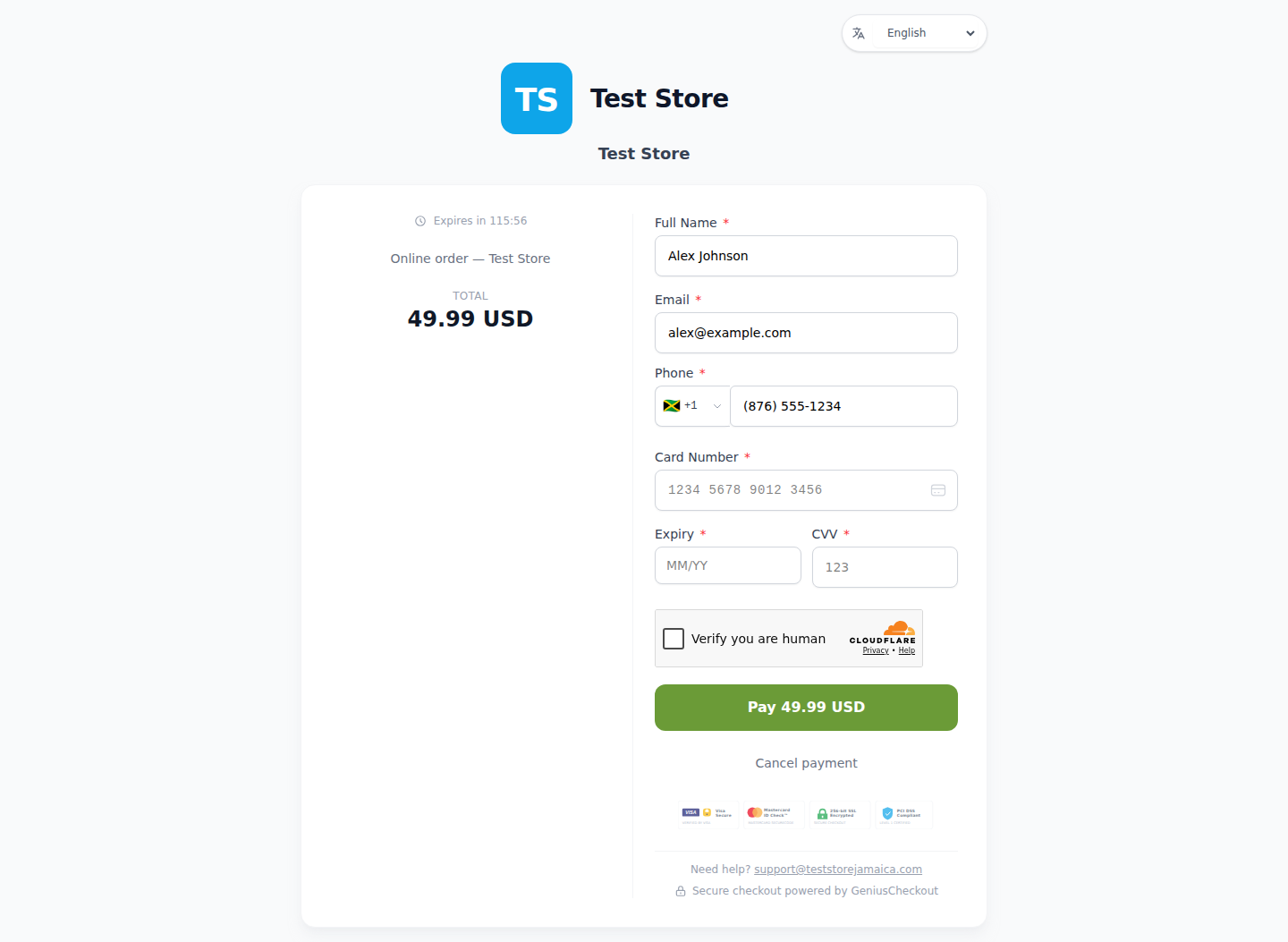
This is a real Genius Checkout Test Store checkout with Powertranz Direct as the only enabled payment gateway. The amount and currency are illustrative; the merchant's bank agreement determines which currencies can be processed and settled.
Frequently asked questions
Can I use CIBC merchant services without a full online store?
The bank decides the approved product. Genius Checkout can provide payment links and QR codes when a cart is not the best fit.
Can I display USD prices?
Only enable a currency after CIBC confirms it for both processing and settlement. The site should state the currency code clearly.
Does a successful test mean the live account is ready?
No. Test and live profiles may have different credentials and enabled features. Verify a low-value live payment and the settlement record.
Sources and next step
- Powertranz merchant locations
- CIBC Caribbean eCommerce
- Powertranz Hosted Payment Page
- Genius Checkout Powertranz overview
- Powertranz configuration guide
Create a Genius Checkout account or book a setup review when the CIBC merchant pack is available.