
On this page
In Barbuda, Genius Checkout currently supports CIBC Caribbean through our Powertranz integration. CIBC Caribbean must approve your eCommerce merchant account and issue Powertranz or First Atlantic Commerce (FAC) credentials before you can connect it to Genius Checkout.
For a small accommodation property, guide, transporter, contractor, or community enterprise, this approach avoids forcing every sale through a large shopping-cart system.
Last reviewed: September 25, 2026.
Confirm that the approved product is Powertranz-compatible
CIBC Caribbean offers eCommerce merchant services, but a merchant should not assume that every digital product uses the same credentials. Ask the merchant-services team to state:
- The gateway name and whether it is Powertranz/FAC.
- Direct or Hosted Payment Page mode.
- Separate test and live Merchant IDs and passwords.
- HPP PageSet and PageName when needed.
- Approved currencies and settlement account.
- 3-D Secure, refunds, and chargeback contacts.
- Tokenization status if the business will charge a later balance.
The Powertranz map supports the relationship statement. The merchant's onboarding pack controls the actual configuration.
Start with a payment link when inventory is confirmed manually
Some Barbuda sales begin with a conversation: staff confirm a room, arrange transport, or quote a service before collecting money. A named payment link can carry the invoice or reservation reference, amount, currency, and buyer details without pretending availability is automatic.
Use a catalogue or booking site when customers can select and pay without staff confirmation. Genius Checkout can connect the same approved Powertranz account to WooCommerce, Ecwid, HighLevel, or a supported custom booking application.
The payment channel should mirror the operation. It should not add a second, conflicting source of reservation truth.
Decide how and when money is collected
An accommodation operator may need to take a deposit and collect the balance later. If CIBC enables split or partial capture, authorize the full booking amount, capture the deposit, then capture the remaining authorized balance later. Otherwise, charge the deposit first and send a new payment request for the balance. Tours may charge in full, while contractors may collect approved milestones. Keep the booking or job reference on every payment record.
Use Authorize & Capture for a payment that should complete immediately. Use Authorize Only only when the merchant account supports later capture and staff know the deadline for acting on the authorization. An authorization is not settlement.
For a stored payment method, obtain clear consent and use only the provider token returned through an approved Direct integration. Never put card details in messages, spreadsheets, or booking notes.
Hosted pages need a clean return path
If CIBC issues a Powertranz HPP profile, the buyer enters card details on the provider-hosted page. The website must preserve the order while the buyer is away, allow cancellation, and return to a useful status page. A browser redirect is not proof that the payment succeeded; confirm the gateway result server-side.
An embedded selling platform may need to open a top-level secure-checkout window because the provider can block iframe display.
Test with the staff who will support customers
Run a successful payment, deliberate decline, cancellation, browser Back, duplicate callback, and refund. Ask the person who normally answers guest or customer questions to locate the order, Genius Checkout receipt, gateway reference, and bank settlement record.
The receipt should show an unambiguous currency code such as XCD when that is the approved transaction currency. If the business quotes visitors in another currency, confirm the processing and settlement arrangement with CIBC before advertising it.
Frequently asked questions
Can I receive payment before my full website is complete?
Potentially. CIBC decides its onboarding requirements, while Genius Checkout payment links can support a simple approved collection flow. The business still needs clear terms, refund information, and a secure public identity.
Can one payment link be reused for every reservation?
A fixed product link may be reusable, but a reservation-specific link is better when amount, customer, or reference changes. Never let a second payment overwrite the first transaction.
Who handles settlement or a chargeback?
CIBC and the merchant agreement govern settlement and disputes. Genius Checkout preserves the order and transaction evidence needed to reconcile the software side.
See the Powertranz checkout experience
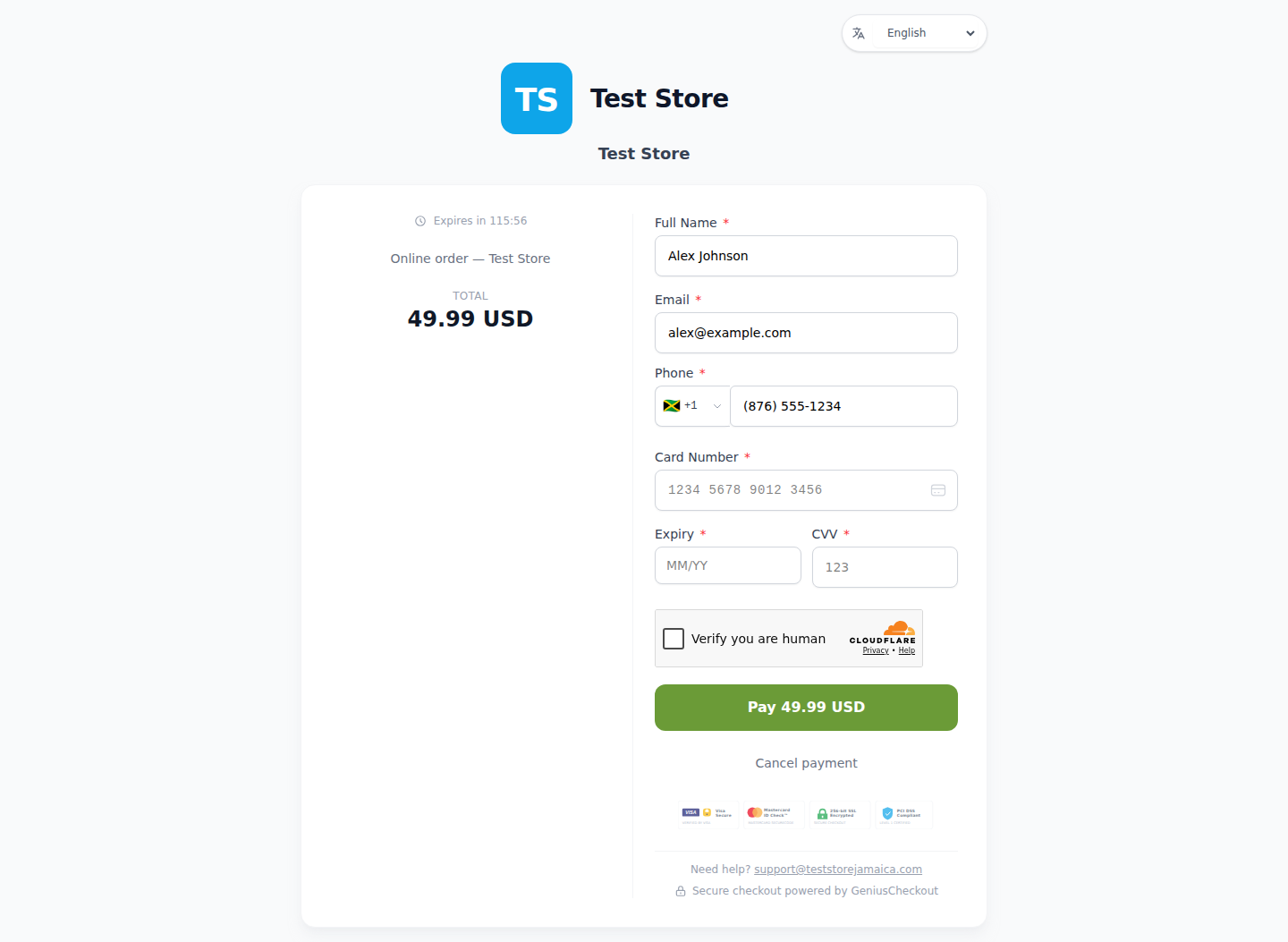
This is a real Genius Checkout Test Store checkout with Powertranz Direct as the only enabled payment gateway. The amount and currency are illustrative; the merchant's bank agreement determines which currencies can be processed and settled.
Sources and next step
- Powertranz merchant locations
- CIBC Caribbean eCommerce
- Powertranz payment gateway
- Genius Checkout payment links and QR codes
- Powertranz configuration guide
Create a Genius Checkout account or book a setup review after confirming the CIBC gateway profile.