
On this page
- Collect a complete technical answer from BAC
- Design around Guatemalan retail and export fulfilment
- Keep GTQ and other currency paths separate
- Handle deposits and balances correctly
- Preserve failed and repeated attempts
- Preguntas que debe hacer el comercio
- Frequently asked questions
- Sources and next step
In Guatemala, Genius Checkout currently supports BAC Credomatic through our Powertranz integration. BAC must approve your eCommerce merchant account and issue Powertranz or First Atlantic Commerce (FAC) credentials before you can connect it to Genius Checkout.
The connection can then support retail, exports, reservations, education, professional services, payment links, or an existing business application.
Last reviewed: September 25, 2026.
Collect a complete technical answer from BAC
Ask whether the product is Powertranz/FAC, which checkout mode it uses, and whether test credentials are available. Confirm GTQ and any additional currencies, settlement, 3-D Secure, refund permissions, and support.
Direct and HPP require different fields. HPP needs PageSet and PageName. Direct tokenization and recurring use need explicit approval. If BAC supplies a credential for a native BAC or another processor, it should not be entered into the Powertranz module.
Design around Guatemalan retail and export fulfilment
A retailer needs stock, delivery, cancellation, and partial-refund rules. An exporter needs shipping evidence and clear cross-border currency. A course provider may need one-time tuition or a recurring schedule. A professional firm may only need a secure invoice payment.
Use:
- WooCommerce for WordPress orders and fulfilment.
- Ecwid for an embedded store.
- HighLevel for services, appointments, funnels, and lead follow-up.
- Payment links and QR codes for an agreed invoice or reservation.
- The Genius Checkout API for an existing ERP or local platform.
Do not put private invoice detail into a public link. Use a safe reference that staff can reconcile internally.
Keep GTQ and other currency paths separate
Show the exact transaction currency at checkout. If the merchant also uses USD, confirm it on the gateway profile and test it separately. Transaction currency, customer display, and settlement can differ; document each.
Handle deposits and balances correctly
A reservation may need a deposit today and the balance closer to arrival. If BAC enables split or partial capture, authorize the full booking amount, capture the deposit, then capture the remaining authorized balance within the permitted authorization period. If that feature is not enabled, charge the deposit and create a new payment for the balance.
Keep the reservation reference on both records, but give every new charge or retry its own gateway order ID. This lets staff see one customer agreement without rewriting a failed or completed transaction.
Preserve failed and repeated attempts
When a card declines, retain the attempt and safe reason. A retry creates a new transaction and gateway order ID. That prevents duplicate-order rejections and gives staff a complete customer-payment history.
Test an approval, decline, 3-D Secure challenge, cancellation, browser Back, duplicate callback, refund, and any recurring flow. Verify the result in the source order, Genius Checkout, Powertranz, and the bank report.
Preguntas que debe hacer el comercio
- ¿La afiliación usa Powertranz/FAC?
- ¿Qué datos corresponden a pruebas y a producción?
- ¿Cuáles monedas puede procesar y liquidar la cuenta?
- ¿La cuenta admite reembolsos parciales y anulaciones?
- ¿Se permite tokenización y cobro recurrente iniciado por el comercio?
Frequently asked questions
Can a BAC Guatemala credential always be used in Genius Checkout?
No. It must be a Powertranz/FAC-compatible credential. Confirm the processor and mode.
Can Genius Checkout connect to a Guatemalan-built system?
Yes, through a supported API integration after the gateway and business flow are reviewed.
Should a retry use the same order number?
Keep the business order reference, but create a new unique payment-attempt identifier for the gateway.
See the Powertranz checkout experience
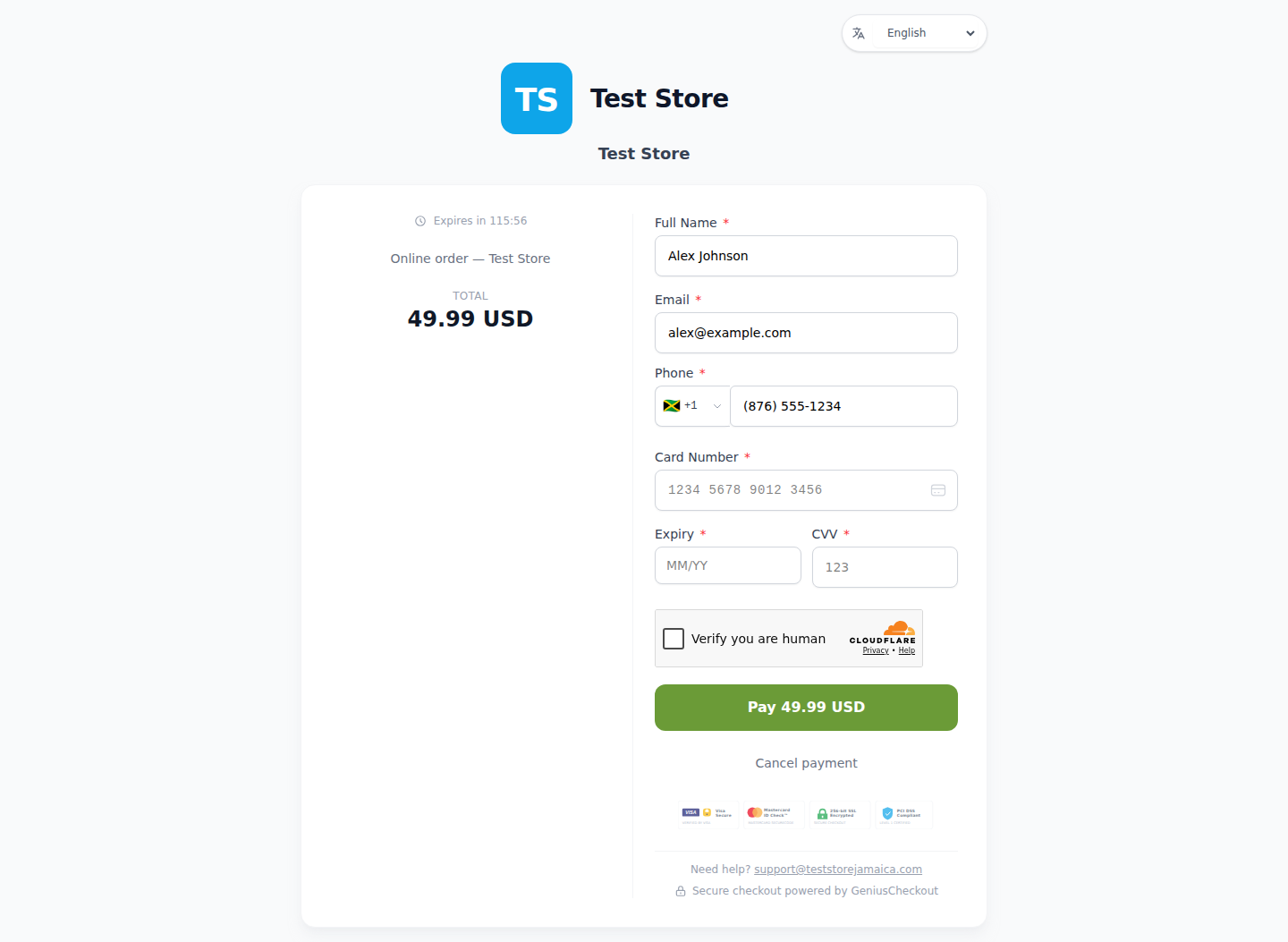
This is a real Genius Checkout Test Store checkout with Powertranz Direct as the only enabled payment gateway. The amount and currency are illustrative; the merchant's bank agreement determines which currencies can be processed and settled.
Sources and next step
- Powertranz merchant locations
- BAC Credomatic business solutions
- Powertranz payment gateway
- Genius Checkout Powertranz overview
- Powertranz configuration guide
Create a Genius Checkout account or book a setup review once BAC confirms the Powertranz-compatible account.